
Real-piano play-along
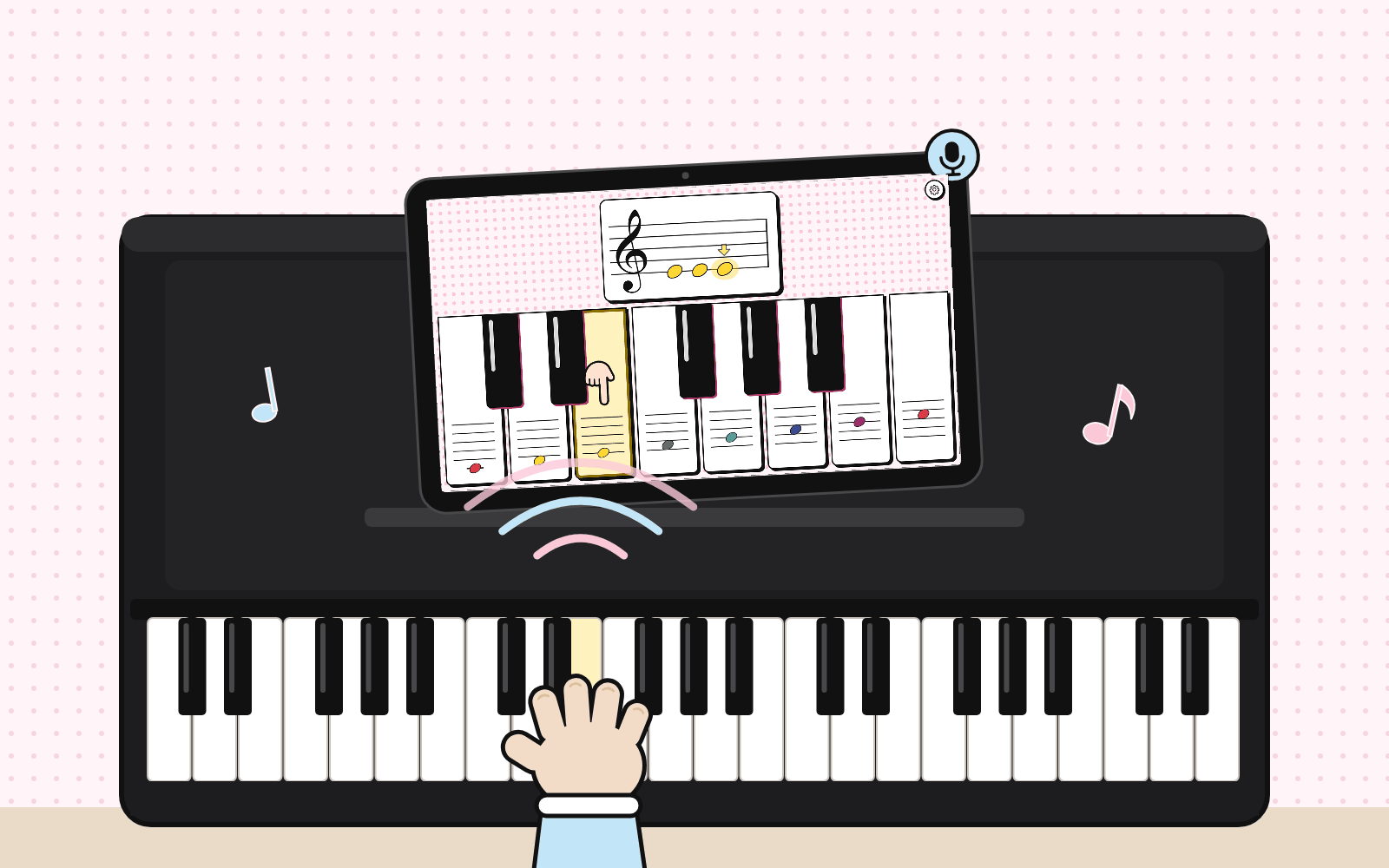
Most music apps keep children tapping glass. Hear-a-Note for Toddlers sends them to the real instrument: the tablet sits on the music stand, shows the note and listens. When your child plays the right key on the piano, the note lights up and soft confetti appears; a wrong key just gets a quiet “mew?”.
- Open the app and put the phone or tablet on the piano’s music stand.
- In the settings, choose “Play a real piano” and allow the microphone.
- Pick a song or the Challenge: the card shows the notes on the staff, with the note to play in its key's color.
- Your child plays it on the real piano — the app hears it, shows the answer and moves on.
Works with acoustic pianos and digital keyboards. Best in a quiet room, one key at a time. The sound is analyzed on the device and never recorded or uploaded.
Four things that make Hear-a-Note for Toddlers different
- No-overstimulation design: soft colors and gentle sounds, no flashing effects, no ads, no endless levels, no reward loops and no autoplay feed. Made for short, happy moments with a grown-up — not for screen time for its own sake.
- Early absolute-pitch foundation: every key plays a true, precisely tuned piano note (standard A = 440 Hz), so your baby hears exactly the same pitch every time — a solid first step for ear training and early absolute-pitch practice.
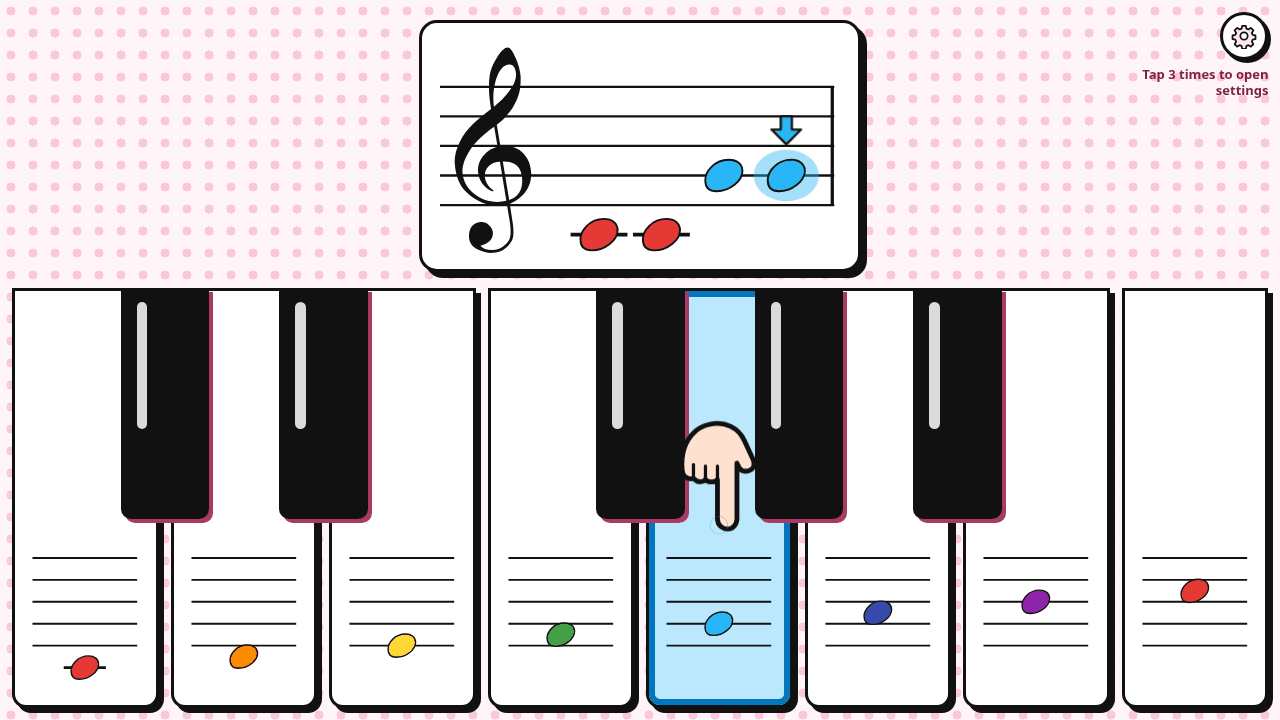
- Natural first sight-reading on the staff: every note appears on a real treble or bass clef staff, every key shows its own note, and the key to play lights up in its soft color. No reading needed — children naturally link the note they see to the key they play.
- Real-piano play-along: the tablet sits on the music stand and listens through the microphone. When your child plays the right key on an acoustic piano or digital keyboard, the note lights up and soft confetti appears — little hands stay on real keys, not on glass.
What is Hear-a-Note for Toddlers?
Hear-a-Note for Toddlers is a free web app that introduces babies and toddlers aged 18–36 months to the piano and to reading music. Every white key shows its own note on a small staff, and the note card above the keys shows the whole bar of the song on a real staff: the note to play and the notes already played are in their key's color, the notes still to come are black. Only that key lights up in its soft color (Do red, Re orange, Mi yellow, Fa green, Sol blue, La deep blue, Si purple), and in songs a little finger presses it. By matching the staff note to the color and the key, children connect what they see, hear and play — long before they can read words. Like every app in the MyTeachers123.com series, Hear-a-Note for Toddlers is not built around screen fun: it is built to work with the real world — here, the real piano in your home.
Quick facts
| Age | 18–36 months (1.5 to 3 years), played together with a grown-up |
|---|---|
| Price | Free. No ads and no in-app purchases |
| Account and privacy | No sign-up. No personal data collected |
| Devices | Any modern browser on iPhone, iPad, Android, Chromebook, Windows and Mac. Can be added to the home screen. Also runs on older iPads and iPhones (iOS 12 and later) |
| Offline | Works offline after the first visit |
| What children learn | Treble clef and Bass clef: one octave from Do to high Do, with black keys |
| Songs | Twinkle Twinkle Little Star, Mary Had a Little Lamb, Ode to Joy, Jingle Bells |
| Ways to play | Free play, play-along songs, a note-reading Challenge, and real-piano mode (listens through the microphone) |
| Languages | English, Español, 繁體中文, 简体中文, 한국어, 日本語, Tiếng Việt, Français, Italiano, Русский, Deutsch, हिन्दी |
For parents of babies and toddlers aged 18–36 months
- Made for little hands: fullscreen, big keys and no words on the keys — each key shows only its note on a small staff, and the key to play lights up in its own soft color.
- Listen first, then play: pick a song and the app plays it slowly while each key lights up; then your child plays along.
- Gentle feedback: a right note brings soft confetti, a wrong note is a quiet kitten “mew” — never scolding.
- Safe by design: no ads, nothing for children to tap by accident, a volume limit for little ears, and the settings stay closed while your child plays.
- Grows with your child: the Challenge starts with Do, Re and Mi. After 3 right answers in a row, little bubbles appear and one more note joins; after 3 misses in a row, one note steps back — up to all 8 notes of a clef.
- Toddler-proof: fullscreen and locked to landscape; the settings open only when a grown-up taps the settings button three times in a row, so little fingers do not tap their way out. For a complete lock, turn on Guided Access (iPhone, iPad) or screen pinning (Android).
For piano teachers and music teachers
Use Hear-a-Note for Toddlers as a warm-up for your youngest students, as a first look at the staff, or as five minutes of home practice between lessons.
- Introduce the treble and bass clef visually, before students can read: staff note → key color → key.
- Real-piano mode listens to an acoustic or digital piano through the device microphone, so students answer on the instrument.
- The Challenge adapts to each child: it starts with Do Re Mi, adds a note after 3 right answers in a row and takes one away after 3 misses, up to all 8 notes of a clef — a playful, step-by-step note-reading practice.
- No accounts and no data collection, so it is easy to recommend to families.
- 12 interface languages help multilingual families practice at home.
How it works
- Open kids.myteachers123.com: the settings open first.
- Choose the treble or bass clef, a song or free play, and the language, then tap “Start”.
- Watch and listen while the song plays, then play along: the key to press lights up in its color and a little finger presses it.
- Try the Challenge: the keys go plain, so your child reads the note on the card and finds the key. Tap the settings button three times in a row to stop or change anything.
Frequently asked questions
What age is Hear-a-Note for Toddlers for?
It is designed for babies and toddlers aged 18–36 months (1.5 to 3 years), played together with a parent or caregiver. There are no letters on the keys: each key shows its note on a small staff, and the key to play lights up in its own color, so children do not need to read. Older children can keep going with the note-reading Challenge.
Is it really free?
Yes. It is free to use, with no ads, no in-app purchases and no sign-up.
Does it collect data about my child?
No personal data is collected. Settings such as the language are saved only on your device. In real-piano mode the microphone sound is analyzed on the device to recognize notes and is not uploaded.
Do we need a real piano?
No. Children play the keys on the screen. If you have a piano or keyboard at home, real-piano mode lets them play on it instead.
Which devices does it work on?
Any modern web browser on phones, tablets and computers, including iPhone, iPad and Android. You can add it to the home screen and use it offline.
Can it help my child learn to read music?
It is a playful first step: children see each note on a real treble or bass clef staff and connect it with a color, a key and a sound.
How can piano teachers use it?
As a warm-up, as a first introduction to the staff and clefs, or as short home practice. Real-piano mode lets students answer on the instrument.
From MyTeachers123
Hear-a-Note for Toddlers is part of the MyTeachers123.com app series. Every app in the series works with the child's real world — a real piano, a real room, a grown-up nearby — instead of keeping them busy on a screen. MyTeachers123.com is a multilingual platform that helps parents find family daycare for infants and toddlers.
Find family daycare on MyTeachers123.com
Run a family daycare or teach young children? List your program on MyTeachers123.com.